
PC expansion brackets and I/O adapters provide a way to expose internal motherboard or add-in-card connections at a computer chassis slot. Products in this category include blank slot brackets, connector-cutout plates and interface brackets for D-sub, Centronics, FireWire and other legacy or specialty connections.
Some products are passive brackets that simply mount a connector or cable assembly; others are true expansion cards that add controller electronics. That distinction matters because a bracket cannot create a port unless the computer already has a compatible internal header or controller.
Select the product by chassis slot form factor, connector opening, internal interface and whether the application needs passive port breakout or an active expansion controller.


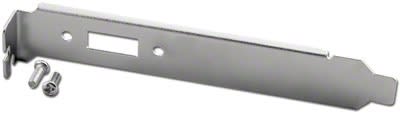


Identify whether the computer uses a full-height or low-profile expansion slot. Bracket height and mounting-tab geometry must match the chassis even when the external connector is correct.
For passive breakout brackets, confirm the internal connector or motherboard header. A DB9 serial bracket, for example, must be wired to the correct serial header pinout; motherboard header layouts are not universally identical.
For active expansion cards, verify the bus interface such as PCI or PCI Express, operating-system support, driver requirements and available slot type.
Connector cutouts alone do not define function. A bracket with a DB25 opening could be used for parallel, serial or proprietary wiring, so match the complete assembly to the system documentation.