
FireWire, standardized as IEEE 1394, was widely used for digital video, professional audio, external storage and computer peripherals before USB became dominant. The interface appeared in several connector styles and performance generations, so replacing a cable requires more than matching the word FireWire.
Common legacy cables use 4-pin or 6-pin IEEE 1394a connectors, while later IEEE 1394b / FireWire 800 equipment commonly uses a 9-pin connector. Six-pin and nine-pin implementations can carry bus power when supported by the equipment; four-pin connections are typically signal-only.
When servicing older cameras, recorders, audio interfaces or drives, identify both endpoint connectors and the FireWire generation supported by the equipment before selecting a replacement cable.

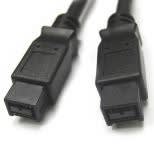

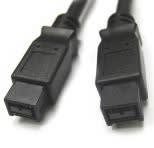

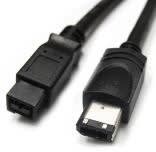
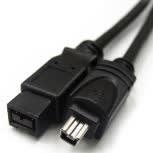


Match the connector at both ends: 4-pin, 6-pin and 9-pin FireWire connectors are physically different. Cables such as 6-pin-to-4-pin and 9-pin-to-6-pin can bridge connector styles only when the connected equipment supports compatible IEEE 1394 signaling.
Do not assume that an adapter cable changes the protocol. A FireWire cable carries IEEE 1394 signals; it does not convert FireWire to USB, Ethernet or another interface unless an active conversion device is specifically designed for that purpose.
For bus-powered devices, confirm whether the host port and cable configuration provide the required power. A four-pin DV-style connection may carry data but not supply device power.
Cable length and signal quality can matter with older high-speed serial buses. For specialized long-distance or industrial installations, verify the equipment documentation rather than extending a standard FireWire cable beyond the intended link design.
