
Shop fiber patch panels and enclosures for terminating, organizing, protecting and distributing fiber optic connections in network and communications installations. Wallco offers rack-mount, distribution and modular fiber-management solutions for a range of optical infrastructure applications.
Compare products by mounting style, fiber capacity, adapter compatibility, termination method and available cable-management features. Select the enclosure or panel that matches the fiber system and physical installation requirements.
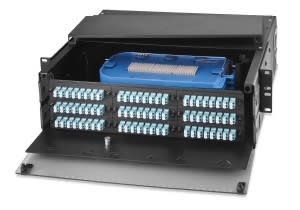


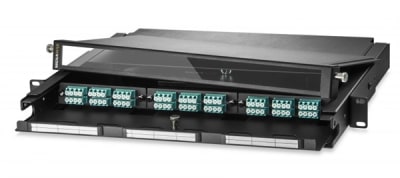


Fiber patch panels and enclosures provide organized locations for terminating, protecting, distributing and managing fiber optic connections. They help transition permanent fiber cabling into accessible connection points where patch cords, adapters, pigtails and network equipment can be interconnected and serviced.
Depending on the network design, fiber-management hardware may be installed in equipment racks, telecommunications rooms, cabinets or other communications spaces. The correct enclosure should provide enough capacity for the fiber count while supporting the adapters, connectors and termination method required by the system.
Fiber panels and enclosures should be selected according to the complete optical infrastructure rather than only the physical size of the enclosure.
Rack-mount fiber enclosures centralize optical connectivity within an equipment rack or network cabinet. They may provide adapter-panel positions, internal fiber storage, splice management and accessible patching points for connections to active network equipment.
When selecting a rack-mounted enclosure, consider both the required fiber capacity and the rack space available. Higher-density installations may require more connection positions while still minimizing the amount of rack space consumed.
The routing of fiber patch cords at the front of the enclosure and incoming fiber at the rear or side should also be considered when planning the rack layout.
Distribution and splice enclosures provide protected locations for organizing optical fibers and making transitions between incoming cable, spliced pigtails, adapters and outgoing connections.
Applications that use fiber pigtails may require splice trays or other internal management hardware to protect completed splices and maintain suitable fiber routing. The enclosure should provide sufficient space to manage fibers without forcing excessive bends or creating unnecessary congestion.
When replacing or expanding an existing enclosure, verify the compatible panels, adapters, splice trays and other accessories required by that enclosure family.
Modular and field-configurable fiber panels can allow installers to select the adapter configuration required for a particular project rather than using a fixed connector arrangement.
This flexibility can be useful when a common enclosure platform must support different connector types, fiber counts or network configurations. However, panels, adapter plates and other inserts should be verified for compatibility with the enclosure in which they will be installed.
Fiber optic cable requires careful handling inside panels and enclosures. Sharp bends, crushing and excessive tension can damage the cable or affect optical performance.
A properly selected enclosure should provide enough internal room to route and store fiber while maintaining appropriate bend radius. Cable-entry points, strain relief and internal routing features can also help protect incoming fiber and finished terminations.
Patch cords exiting the front of a panel should also be routed so they are protected from sharp bends and accidental pulling.
Fiber patch panels commonly provide the interface between permanent optical cabling and active network equipment. Fiber patch cords can connect the panel to switches, media converters, transceiver modules and other optical network devices.
The adapter type installed in the panel should match the patch cords used at the connection point. The patch cords and permanent fiber infrastructure must also be compatible with the optical system, including fiber type and the requirements of the transceivers or other equipment at both ends of the link.
Fiber optic panels and enclosures may be used in applications including:
A fiber enclosure is only one part of the termination system. Adapter plates, couplers, connectors, pigtails, splice trays and patch cords may all need to work together within the finished installation.
Before ordering, determine the fiber count, fiber type, connector format, termination method and mounting requirements. For an existing installation, identify the enclosure family and compatible accessories before replacing individual panels or internal components.
